
Spotify网页播放器-SpotifyEmbedded
基于 Spotify Embed URL 封装的 网页播放器 组件,支持样式与展示方式的可配置化扩展。
💡 动机
为什么要做这个组件?
- 统一 Spotify Embed 的样式与布局控制
- 支持多展示模式以适配不同页面场景
- 原生 iframe 不支持
normal与compact模式的响应式自动切换。
🎯 设计目标
可配置能力
- ✅ 支持切换播放列表
- ✅ 支持展示模式控制(常规模式 / 紧凑模式 / 自适应模式)
🎧 获取 Embedded playlist
详情
入口

生成代码
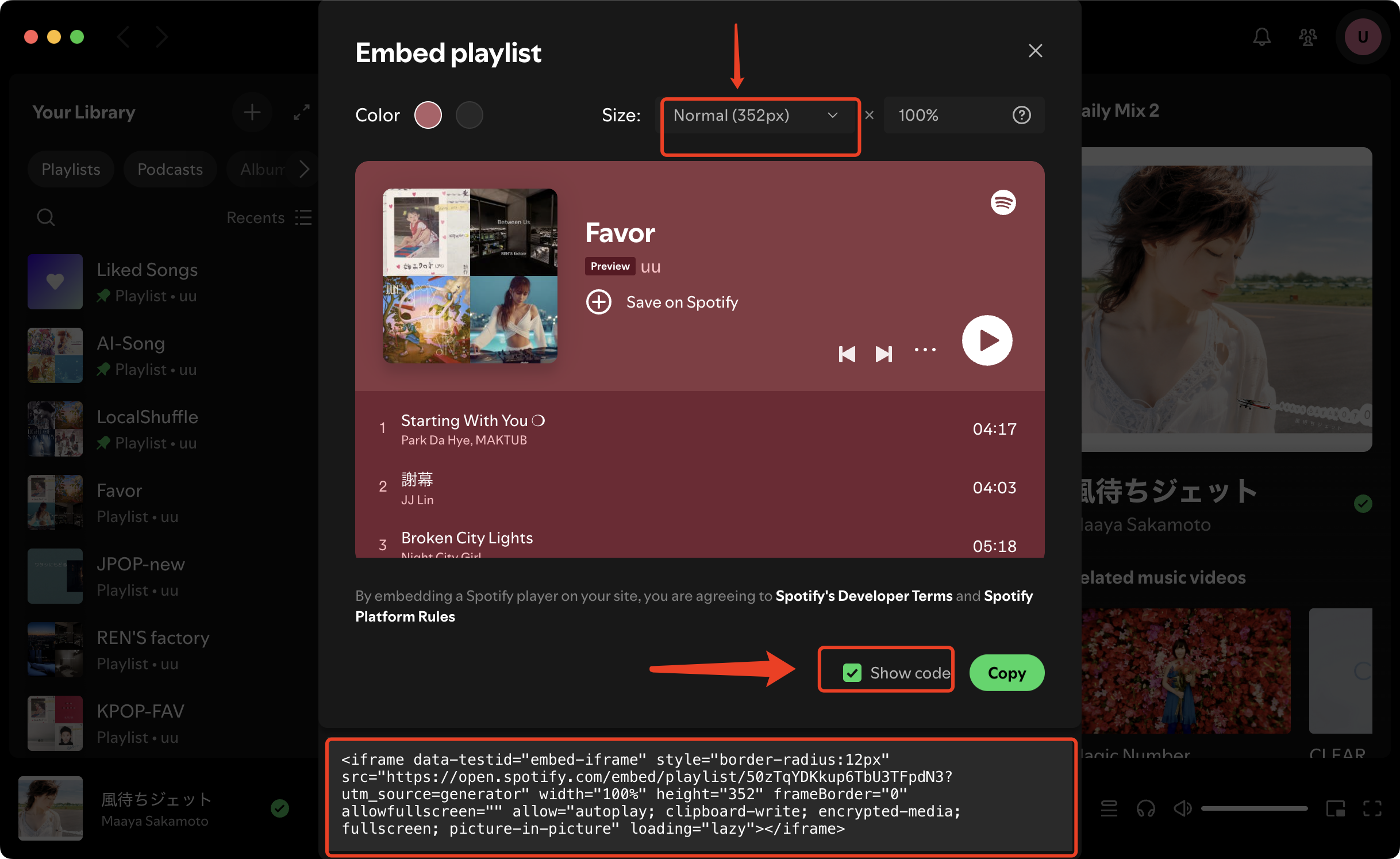
获取代码
常规模式 与 紧凑模式,差别仅为播放器高度而已常规模式与紧凑模式仅在高度上不同,其它展示行为一致。
- 常规模式高度: 352px
- 紧凑模式高度: 152px
📥 常规模式<iframe data-testid="embed-iframe" style="border-radius:12px" src="https://open.spotify.com/embed/playlist/50zTqYDKkup6TbU3TFpdN3?utm_source=generator" width="100%" height="352" frameBorder="0" allowfullscreen="" allow="autoplay; clipboard-write; encrypted-media; fullscreen; picture-in-picture" loading="lazy"></iframe>⚡ 紧凑模式<iframe data-testid="embed-iframe" style="border-radius:12px" src="https://open.spotify.com/embed/playlist/50zTqYDKkup6TbU3TFpdN3?utm_source=generator" width="100%" height="152" frameBorder="0" allowfullscreen="" allow="autoplay; clipboard-write; encrypted-media; fullscreen; picture-in-picture" loading="lazy"></iframe>上述代码中
50zTqYDKkup6TbU3TFpdN3即为该组件的playlistId
✍️ 实现步骤
编写组件
新建组件文件,路径为:
.vuepress/theme/components/about/SpotifyEmbedded.vue,并实现如下内容<template> <iframe title="Spotify Embedded Player" class="spotify" :src="src" :style="iframeStyle" loading="lazy" allow="autoplay; clipboard-write; encrypted-media; fullscreen; picture-in-picture" /> </template> <script setup lang="ts"> import { computed } from "vue" import { useData } from "vuepress-theme-plume/composables" const props = withDefaults(defineProps<{ playlistId: string mode?: 'normal' | 'compact' | 'full' height?: number }>(), { mode: 'normal' }) const { isDark } = useData() /** Spotify embed url */ const src = computed(() => { const theme = isDark.value ? 0 : 1 return `https://open.spotify.com/embed/playlist/${props.playlistId}?utm_source=generator&theme=${theme}` }) const iframeHeight = computed(() => { if (props.height != null) return `${props.height}px` const map: Record<'compact' | 'normal' | 'full', string> = { compact: '152px', normal: '352px', full: '100%', } return map[props.mode] ?? '152px' }) const iframeStyle = computed(() => ({ width: "100%", height: iframeHeight.value, border: 0, })) </script> <style scoped> .spotify { display: block; width: 100%; height: 100%; border: 0; border-radius: 12px; overflow: hidden; transition: opacity 0.35s ease, transform 0.35s ease; } </style>注册组件
修改如下文件:
.vuepress/theme/client.tsimport { defineClientConfig } from 'vuepress/client' import SpotifyEmbedded from './theme/components/about/SpotifyEmbedded.vue' export default defineClientConfig({ enhance({ app }) { app.component('SpotifyEmbedded', SpotifyEmbedded) }, })使用组件
该组件可在任意位置使用,例如文章或博客中
<SpotifyEmbedded playlistId="50zTqYDKkup6TbU3TFpdN3" />注意
若是在
首页使用组件时,请确保在首页的Frontmatter中配置type: custom,否则组件不生效点击展开
  ---
  home: true
  pageLayout: home
  externalLinkIcon: false
  config:
  - type: custom
  ---
组件效果
📖 属性定义
Spotify 播放列表 ID
normal
强制显示模式
normal: 常规模式,默认高度352pxcompact: 紧凑模式,默认高度152pxfull: 自适应布局模式,高度继承父级容器的尺寸
组件高度,设置高度后,忽略 mode
🚀 用法用例
| 模式 | 说明 | 样例 |
|---|---|---|
| 默认 | 默认: 常规模式 | <SpotifyEmbedded playlistId="50zTqYDKkup6TbU3TFpdN3" /> |
| 强制常规 | 高度始终为 352px | <SpotifyEmbedded playlistId="50zTqYDKkup6TbU3TFpdN3" mode="normal" /> |
| 强制紧凑 | 高度始终为 152px | <SpotifyEmbedded playlistId="50zTqYDKkup6TbU3TFpdN3" mode="compact" /> |
| 自适应模式 | 高度继承父级容器的尺寸 | <SpotifyEmbedded playlistId="50zTqYDKkup6TbU3TFpdN3" mode="full" /> |
| 自定义高度 | 设置为指定高度 | <SpotifyEmbedded playlistId="50zTqYDKkup6TbU3TFpdN3" :height="152" /> |
强制显示模式
✨ 效果预览
1️⃣ 默认模式
2️⃣ 强制常规模式
3️⃣ 强制紧凑模式
4️⃣ 自适应模式
若无父容器,不建议使用该 模式,使用时需手动指定 height: 152
<SpotifyEmbedded playlistId="50zTqYDKkup6TbU3TFpdN3" mode="full" :height=152 />5️⃣ 自定义高度
💭 启发
🎵 Apple Music Playlist
同理,也可以尝试封装 Apple Music
<iframe height="450" width="100%" title="Media player" src="https://embed.music.apple.com/cn/album/first-kiss/1443278696?itscg=30200&itsct=music_box_player&ls=1&app=music&mttnsubad=1443278696&theme=auto" id="embedPlayer" sandbox="allow-forms allow-popups allow-same-origin allow-scripts allow-top-navigation-by-user-activation" allow="autoplay *; encrypted-media *; clipboard-write" style="border: 0px; border-radius: 12px; width: 100%; height: 450px; max-width: 660px;"></iframe>🔖 总结
相关信息
本组件对 Spotify 官方 iframe 做了轻量封装,统一了展示样式,并通过 mode 和 breakpoint 提供简单的展示与响应式切换能力,让嵌入使用更便捷一致。
更新日志
版权所有
版权归属:EmirioBomb