
Spotify Embedded Player-SpotifyEmbedded
A web player component based on Spotify Embed playlist
💡 Motivation
Why I built this?
- Controls player layout style
- Supports multiple display modes to suit different page needs
- The native iframe doesn’t support responsive switching between
normalandcompactmodes
🎯 Goals
Configurable Props
- ✅ Supports playlist switching
- ✅ Supports display mode control (normal mode / compact mode / full mode)
🎧 Get Embedded playlist
Click to show more
Entry

Generate Code
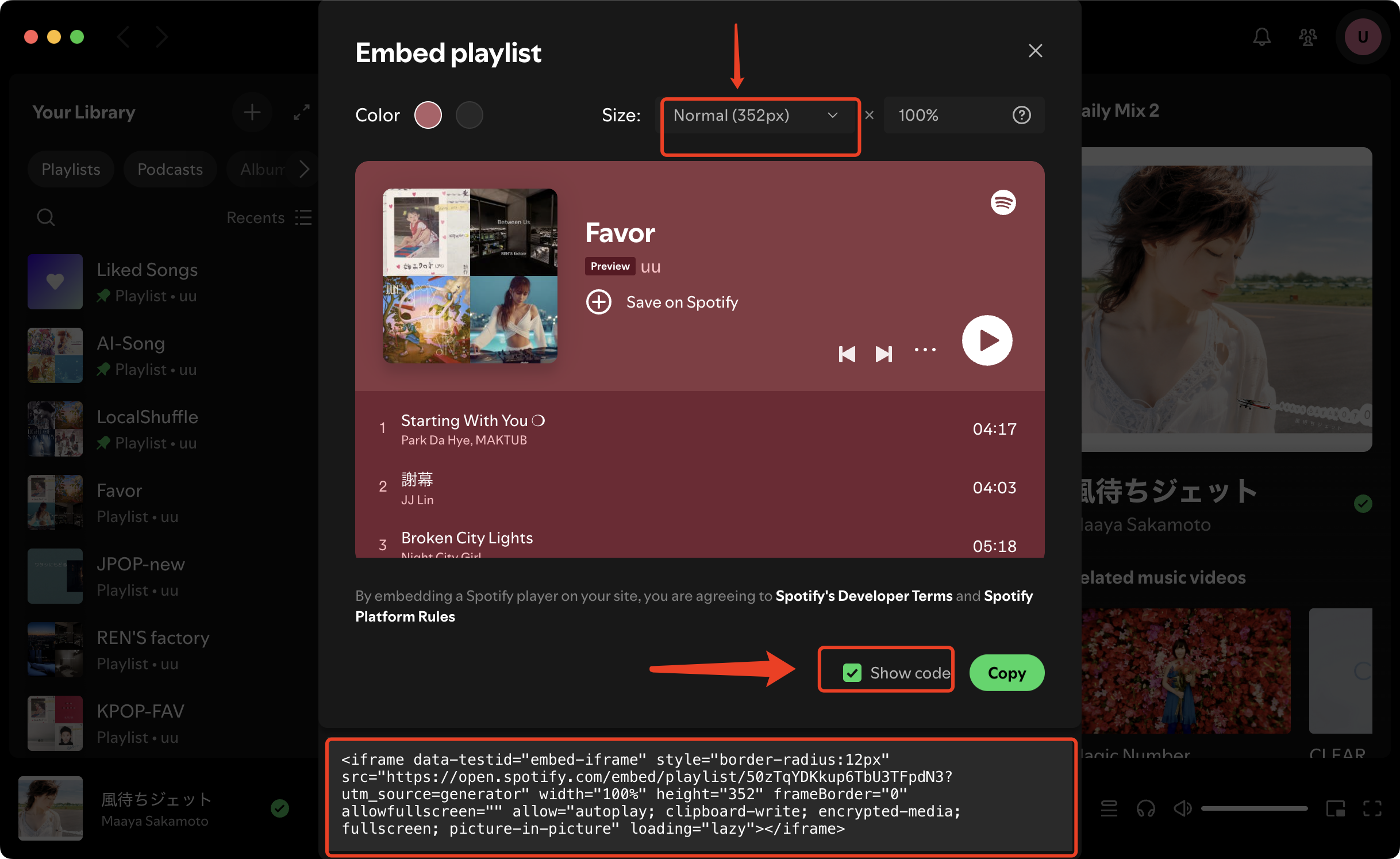
Copy Code
Normal and Compact differ only in player height
- Normal: 352px
- Compact: 152px
📥 Normal<iframe data-testid="embed-iframe" style="border-radius:12px" src="https://open.spotify.com/embed/playlist/50zTqYDKkup6TbU3TFpdN3?utm_source=generator" width="100%" height="352" frameBorder="0" allowfullscreen="" allow="autoplay; clipboard-write; encrypted-media; fullscreen; picture-in-picture" loading="lazy"></iframe>⚡ Compact<iframe data-testid="embed-iframe" style="border-radius:12px" src="https://open.spotify.com/embed/playlist/50zTqYDKkup6TbU3TFpdN3?utm_source=generator" width="100%" height="152" frameBorder="0" allowfullscreen="" allow="autoplay; clipboard-write; encrypted-media; fullscreen; picture-in-picture" loading="lazy"></iframe>50zTqYDKkup6TbU3TFpdN3is theplaylistIdused by the component.
✍️ Implementation
How to create
Create
.vuepress/theme/components/about/SpotifyEmbedded.vueand define the component as follows:<template> <iframe title="Spotify Embedded Player" class="spotify" :src="src" :style="iframeStyle" loading="lazy" allow="autoplay; clipboard-write; encrypted-media; fullscreen; picture-in-picture" /> </template> <script setup lang="ts"> import { computed } from "vue" import { useData } from "vuepress-theme-plume/composables" const props = withDefaults(defineProps<{ playlistId: string mode?: 'normal' | 'compact' | 'full' height?: number }>(), { mode: 'normal' }) const { isDark } = useData() /** Spotify embed url */ const src = computed(() => { const theme = isDark.value ? 0 : 1 return `https://open.spotify.com/embed/playlist/${props.playlistId}?utm_source=generator&theme=${theme}` }) const iframeHeight = computed(() => { if (props.height != null) return `${props.height}px` const map: Record<'compact' | 'normal' | 'full', string> = { compact: '152px', normal: '352px', full: '100%', } return map[props.mode] ?? '152px' }) const iframeStyle = computed(() => ({ width: "100%", height: iframeHeight.value, border: 0, })) </script> <style scoped> .spotify { display: block; width: 100%; height: 100%; border: 0; border-radius: 12px; overflow: hidden; transition: opacity 0.35s ease, transform 0.35s ease; } </style>How to register
Update
.vuepress/theme/client.tsas follows:import { defineClientConfig } from 'vuepress/client' import SpotifyEmbedded from './theme/components/about/SpotifyEmbedded.vue' export default defineClientConfig({ enhance({ app }) { app.component('SpotifyEmbedded', SpotifyEmbedded) }, })How to use
You can use this component anywhere, such as in posts or blogs.
<SpotifyEmbedded playlistId="50zTqYDKkup6TbU3TFpdN3" />Warning
When using this component on the
homepage, remember to settype: customin theFrontmatter, otherwise it won’t render properly.Click to show more
  ---
  home: true
  pageLayout: home
  externalLinkIcon: false
  config:
  - type: custom
  ---
Final Result
📖 Props
Spotify playlist ID
normal
Display mode (forced)
normal: standard mode, default height352pxcompact: compact mode, default height152pxfull: Adaptive layout mode; height inherits the parent container's size
Component height, overrides the mode when set
🚀 Usage
| Mode | Description | Examples |
|---|---|---|
| default | Default: normal mode | <SpotifyEmbedded playlistId="50zTqYDKkup6TbU3TFpdN3" /> |
| normal | Height is fixed at 352px | <SpotifyEmbedded playlistId="50zTqYDKkup6TbU3TFpdN3" mode="normal" /> |
| compact | Height is fixed at 152px | <SpotifyEmbedded playlistId="50zTqYDKkup6TbU3TFpdN3" mode="compact" /> |
| full | Height inherits the parent container's size | <SpotifyEmbedded playlistId="50zTqYDKkup6TbU3TFpdN3" mode="full" /> |
| custom height | Set custom height | <SpotifyEmbedded playlistId="50zTqYDKkup6TbU3TFpdN3" :height=152 /> |
Display Mode
✨ Preview
1️⃣ default
2️⃣ normal
3️⃣ compact
4️⃣ full
This mode is not recommended without a parent container, requires a manual height: 152
<SpotifyEmbedded playlistId="50zTqYDKkup6TbU3TFpdN3" mode="full" :height=152 />5️⃣ custom height
💭 Inspiration
🎵 Apple Music Playlist
Apple Music can be wrapped in the same way.
<iframe height="450" width="100%" title="Media player" src="https://embed.music.apple.com/cn/album/first-kiss/1443278696?itscg=30200&itsct=music_box_player&ls=1&app=music&mttnsubad=1443278696&theme=auto" id="embedPlayer" sandbox="allow-forms allow-popups allow-same-origin allow-scripts allow-top-navigation-by-user-activation" allow="autoplay *; encrypted-media *; clipboard-write" style="border: 0px; border-radius: 12px; width: 100%; height: 450px; max-width: 660px;"></iframe>🔖 Summary
Info
A lightweight wrapper around Spotify’s official iframe, standardizing the UI and providing simple mode and breakpoint controls for consistent display and responsive switching.
Changelog
Copyright
Copyright Ownership:EmirioBomb
License under:Attribution 4.0 International (CC-BY-4.0)